2 Business Scenario
In this chapter, we describe the business scenario that is implemented in the BPA Lab. The scenario is a fictional bicycle manufacturer that offers highly customisable bicycles to consumers. The end-to-end process includes order management, production control, purchasing, manufacturing, shipping, and warehouse operations.
In addition complementary business processes are described, which can be used for additional implementation projects, e.g. Agentic AI in business process automation.
2.1 The implemented business scenario
A bicycle manufacturer offers highly customisable bicycles to consumers.
The entire end-to-end process is orchestrated by the order management process, which in turn initiates purchasing, manufacturing, and shipping processes as needed.
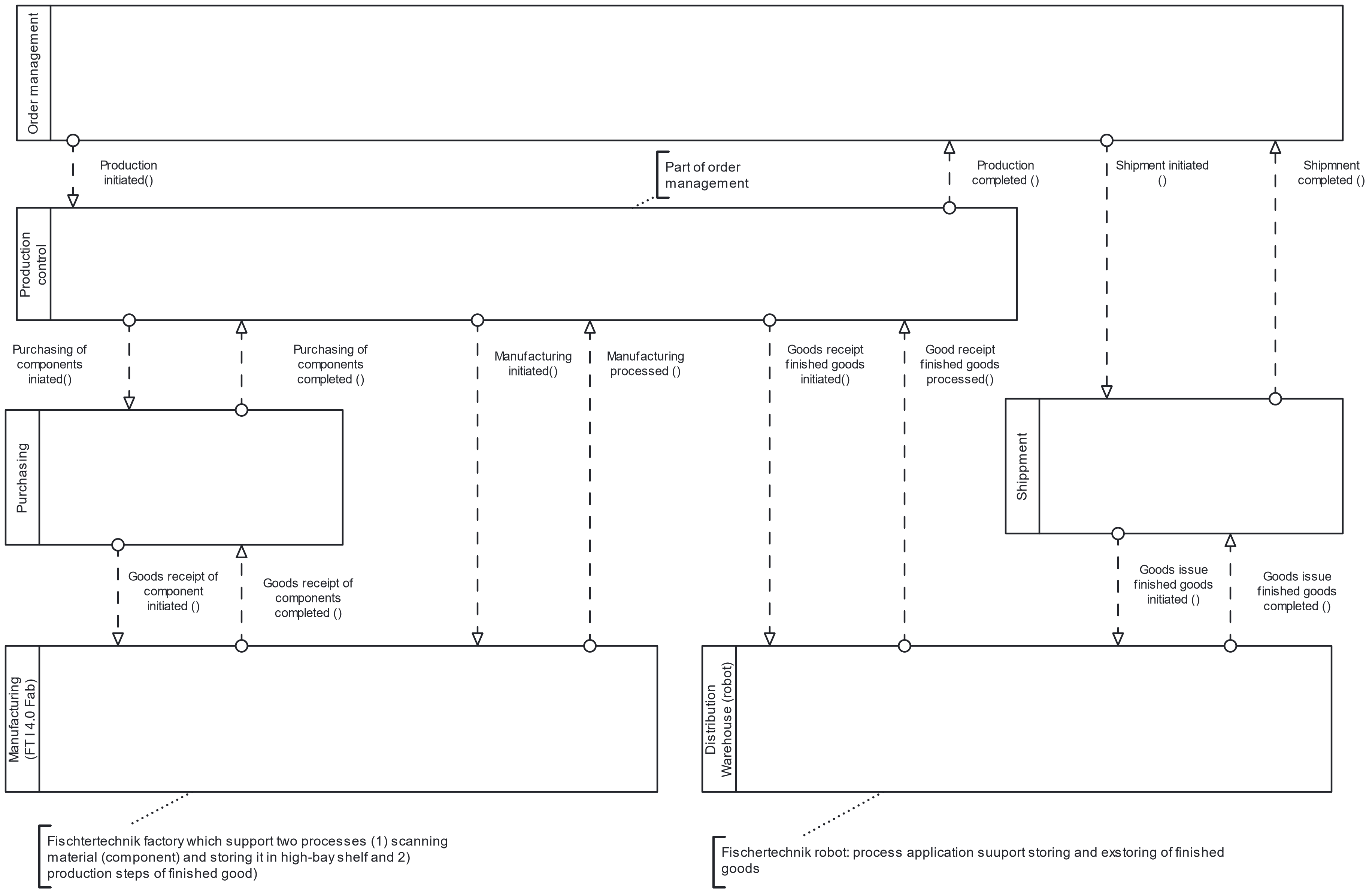
The manufacturing processes use the Fischertechnik Industry 4.0 factory to post goods receipts of components and to perform the actual manufacturing steps. Order management and shipping additionally use the distribution warehouse (a separate Fischertechnik robot) to post goods receipts and goods issues for finished products.
The following sections describe each sub-process in turn. The process models represent mainly the happy path of execution (to be extended).
2.1.1 Order management

The order management process governs the fulfilment of customer orders.
It starts when a customer order is entered into a web form, which is pre-filled with product data (bicycle models) from the database. During execution, the availability of the ordered products is checked.
Two main scenarios apply:
- All products in stock: the shipping process is triggered directly. Once shipping completes successfully, the process is finished.
- One or more products out of stock: for each unavailable product, the production control process is triggered, which creates a production order. The production order specifies the required components.
- If the components are also unavailable, a purchasing process is started first.
- Otherwise, the manufacturing process is triggered immediately.
Once the missing products are manufactured, shipping is initiated.
2.1.2 Production control

The production control process manages the creation and execution of one production order for one product. It determines the component demand and — if needed — triggers a purchasing process to procure the missing components. Once components are available, it triggers the actual manufacturing process.
2.1.3 Purchasing

The purchasing process manages the procurement of required components. It starts whenever a component is needed and creates a purchase order.
The purchase order can be adjusted by the user — for example by selecting a specific vendor. Materials are then stored and stock levels are updated. Upon user confirmation (or after a configurable timeout), the stock level is increased in the inventory database.
2.1.4 Manufacturing

The manufacturing process governs the physical manufacturing simulation on the Fischertechnik factory for one item of one product type.
It starts after a production order has been created by the production control process and sufficient components are available.
The process must place a manufacturing order that produces a new bicycle from the specified material. Before that, however, it must check whether a physical workpiece is already available in the warehouse of the Fischertechnik factory. If not, a physical workpiece must first be transferred to the factory so that the control program can store and recognise it. Once the bicycle has been produced from the material (workpiece), the process is complete.
2.1.5 Shipment

The shipment process manages the dispatch of finished goods to the customer. It is only triggered if a product is in stock and ready to be shipped.
The flow is:
- Shipping data is checked.
- The distance and duration from the warehouse to the delivery address are computed — the Openrouteservice API is used for this.
- The logistics sub-process retrieves the customer order from the warehouse.
- A message is sent to the customer to inform them about the dispatch.
- Upon handover of the order to the customer, both the shipping process and the surrounding end-to-end process instance are completed.
2.1.6 Warehouse operations
The warehouse operations process governs the flow of finished goods in a distribution warehouse — represented physically by the Fischertechnik warehouse robot.
It starts when a transfer order for the warehouse is received from another business process. A transfer order can be either an instruction to store products in the warehouse or to retrieve products from it.
2.2 Complementary business scenario
This section describes complementary business scenarios/processes that are not yet implemented or integrated in the current system, but have and can be used for projects.
2.2.1 Business Scenario: Custom Lead management für high-end custom bicycles
This business scenario deals with managing leads and orders for custom high-end bicycles. Remark: This description was designed to show case AI assisted process analysis. The content generation was supported by Claude AI.
2.2.1.1 IT landscape
Its IT landscape is a mix of standard software, lightweight cloud tools, and a collection of Excel files and PDF templates that sales and the workshop have built up themselves over time. There is no single system that covers the full order from inquiry to handover end-to-end. Instead, information lives across the following systems and storage locations: - Website with configurator (WordPress plus a simple form plugin): produces an email and writes a row into a Google Sheets table. - HubSpot CRM (free tier): leads and contacts maintained by sales through manual entry. - Shared Google Drive folder per project, named YYYY-NNN_LastName (e.g. 2026-042_Mueller): contains PDF quotes, scanned signatures, fitting reports, CAD exports, paint renderings, and progress photos. - Excel pricing calculator (Calculation_v17_final_NEW.xlsx): duplicated by sales for each project and filled in with the specification. - CAD system BikeCAD Pro on a single workstation used by the frame designer; geometry data leaves the system as a PDF export. - Paint configurator (browser-based, external vendor): produces PNG renderings that are downloaded individually. - DocuSign for legally binding signatures (indicative quote, binding specification, handover protocol). - Stripe for payments, reconciled against Sage 50 (accounting). - Workshop whiteboard and a laminated A3 sheet per bike acting as a physical traveler — the workshop deliberately stays largely paper-based. - WhatsApp and email as the main communication channels with the customer, occasionally supplemented by video calls. There is no customer portal. Status information reaches the customer through update emails or WhatsApp messages that the sales engineer writes.
Information Processing per Process Step (As-Is): The following description makes visible, for each step, what data is created, how it is captured, and where it is stored.
2.2.1.2 Lead Capture and Qualification
The customer fills in the web form. The plugin sends an email to sales and writes a record into a Google Sheet. These two data stores are independent and are not synchronized to HubSpot. In the morning, the sales engineer reviews the inbox, opens HubSpot, and creates a new contact and deal by taking name, email, phone, and the configurator answers from the form email. Body measurements and budget are placed into a free-text notes field — there are no structured custom properties for them. For the capacity check, the sales engineer opens a separate Excel file Workshop_Capacity_2026.xlsx that the workshop manager updates once a week. If the lead is declined, sales writes an individual email and sets the deal stage in HubSpot to “Lost”.
2.2.1.3 Discovery Call, Indicative Quote, Design Deposit
The discovery call runs on Zoom. The sales engineer takes notes in a Word document that is later exported to PDF and copied into the project folder — the project folder is only created after the design deposit is paid, so until then the notes sit on the sales engineer’s local desktop. For the indicative quote, sales open the Excel pricing calculator, duplicates it via “Save As”, and assigns a file name with the project number. The specifications from the call are entered into the calculator cells. The calculator returns a price range; the result is transferred into a Word quote template. The Word file is exported to PDF, uploaded to DocuSign, and sent to the customer. After signing, sales download the signed PDF from DocuSign and places it into the — now newly created — project folder. The design deposit is collected through a Stripe payment link generated from the Stripe dashboard and pasted into an email. Payment receipt is verified by reviewing the Stripe dashboard daily; there is no webhook into HubSpot. Once payment is in, the deal is moved to the “Design” stage in HubSpot, a project number is pulled from a separate counter Excel file, and the Google Drive folder is created.
2.2.1.4 Bike Fitting and Gate 1 (Fit Data Approval)
If the fitting takes place in Köln, the in-house fitter uses the Retül software, exports the result as PDF, and places it in the project folder. If it happens at a partner fitter, the report arrives by email attachment in one of twelve different formats — every partner uses their own tool. Sales reviews the attachment and enters the key dimensions (saddle height, stack, reach, cleat position, shoulder width) into an Excel sheet called Fit_Data_Consolidation.xlsx so that the frame designer can work from a single consistent format. For the approval (Gate 1), sales emails the fitting PDF plus a short summary to the customer and, in parallel, to the workshop manager. Approval comes back as an email reply (“looks good, approved” or follow-up questions). The confirmation emails are filed into the project folder as .eml files.
2.2.1.5 Design Proposal and Customer Review Loops
The frame designer takes the consolidated fit data from the Excel sheet and enters it into BikeCAD. The finished geometry drawing is exported as PDF. The tubeset specification (Columbus type, wall thicknesses, braze-on parts) is maintained in a separate Word template. The component list is built in another Excel sheet that draws on a supplier price list maintained by the workshop manager. This price list is refreshed once per quarter. The paint scheme is designed in the external paint configurator; the final PNG renderings are downloaded and placed into the project folder. Sales then assembles a PDF design dossier from all these individual documents and sends it to the customer by email. The revision rounds run over email. Customer change requests (“shorten the stem by 1 cm”, “matte paint, RAL 7016 instead of 7021”) are collected by sales, forwarded to the designer and the paint configurator, and after rework sent back out as a new dossier. Versioning is handled through file names (Design_Dossier_v1.pdf, v2.pdf, v2_final.pdf, v2_final_CORRECTED.pdf). Tracing which version the customer last saw, or what changed between v2 and v3, relies on the email thread.
2.2.1.6 Gate 2 — Binding Specification and 40% Deposit
After customer approval, sales consolidates the approved individual documents into a final specification document (Word → PDF). This document is signed via DocuSign by both customer and managing director. The 40% deposit is collected through a Stripe link with reconciliation through the Stripe dashboard. At this point, the bill of materials for procurement and production is created. The workshop manager opens the signed specification PDF and enters the components into an Excel sheet (Master_BoM.xlsx), which is then emailed to the buyer and to production. In parallel, the workshop manager adds the project to the capacity Excel so the next discovery call can assess capacity correctly.
2.2.1.7 Status Communication and Gates 3/4 During Production
During the 8–16 weeks of production, the workshop works with the laminated A3 traveler and the whiteboard. Status lives on these physical artifacts. If sales wants to know where a project stands, they walk into the workshop or call the workshop manager. Customer updates are produced on an ad-hoc basis: when the workshop manager hits a meaningful milestone, they photograph the bike with their smartphone, send the photo by WhatsApp to sales, who then composes an update email or WhatsApp message to the customer. For Gate 3 (paint approval after primer), the paint shop photographs the bike, emails the images to sales, who forwards them on. Approval comes back by reply email or WhatsApp and is filed by sales as a screenshot or .eml file in the project folder. Gate 4 before final assembly works the same way. Change requests during production (“different saddle color after all”) travel through the same channels: the customer sends a WhatsApp to sales, sales emails the workshop manager, the workshop manager writes the change onto the traveler by hand and informs the affected workshop staff verbally. Additional cost is estimated case-by-case and added to the final invoice.
2.2.1.8 Handover, Final Payment, and Project Closure
The final invoice (60%) is created in Sage 50 from the Excel calculation plus any change orders, and sent by email with a Stripe link. Payment receipt is verified through the Stripe dashboard. At the handover appointment, the handover protocol is filled out on a prepared PDF form on a tablet, signed by the customer with a finger, and filed as a PDF in the project folder. Warranty registration and scheduling of the free 90-day fit-tuning appointment are entered into HubSpot and into a Google Calendar. The project folder lives on as an archive.